
Customizing the LSF Application Environment
Edit the LSF Environment JSON for Your Purposes:
Copy
default-lsf-env.jsonto something convenient likeenv0.json.- CODE
cp default-lsf-env.json env0.json
"EnvName"is set tolsfby default, but you can specify something unique if needed.NOTE: Currently,
-characters are not supported in values forEnvName.
The default environment asset has only one pool defined. Notice in the previous example that two pools are defined. When duplicating, be sure to add a comma to separate pools.
PoolName: This will be the apparent hostnames of the compute resources provided for slurm.It is recommended that all pools share a common trunk or base in each
PoolName.
PoolSize: This is the maximum number of these compute resources.ProfileName: This is the default profile name,az1: If this is changed, you will need to carry the change forward.CPUs: This is the targeted CPU-core limit for this "hardware" configuration or pool.ImageName: This is the image added to the libarary in an earlier step.MaxMemory: This is the targeted memory limit for this "hardware" configuration or pool.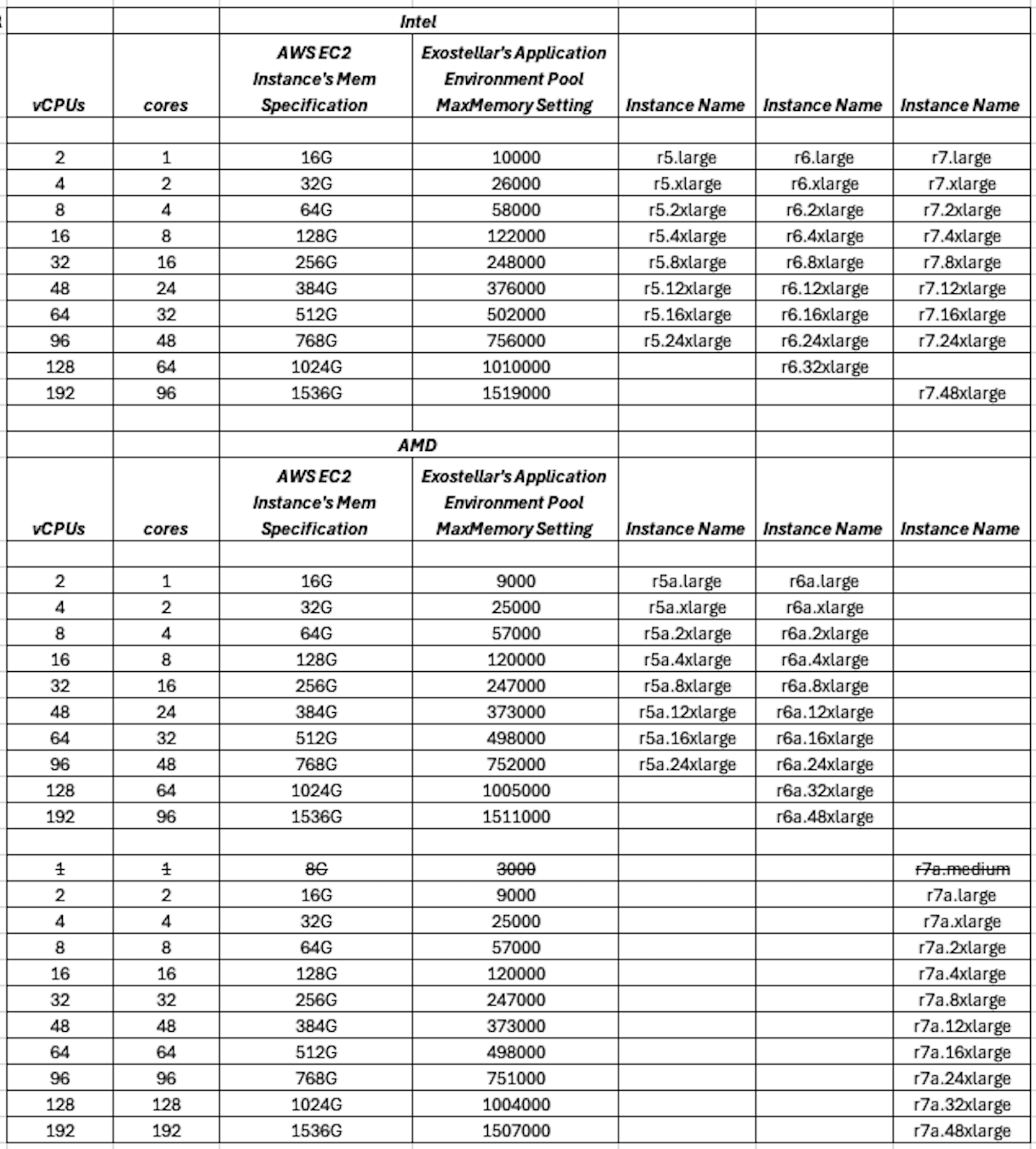
MinMemory: reserved for future use; can be ignored currently.UserData: This string is a base64 encoded version of user_data.To generate it:
cat user_data.sh | base64 -w 0
To decode it:
echo "<LongBase64EncodedString>" | base64 -d
It’s not required to be perfectly fine-tuned at this stage; it will be refined and corrected later.
Example
user_data.sh:- CODE
#!/bin/bash
set -x
IP=$( hostname -I |awk '{print $1}' )
NEW_HOSTNAME=ip-$( echo ${IP} |sed 's/\./-/g' )
hostname ${NEW_HOSTNAME}
echo >> /etc/hosts
echo -e "${IP}\t\t${NEW_HOSTNAME}" >> /etc/hosts
. /opt/lsf/conf/profile.lsf
lsadmin limstartup
lsadmin resstartup
badmin hstartup
All other fields/lines in this asset can be ignored currently.